DNS Switcher Network Tools: DNS control for Android and TV
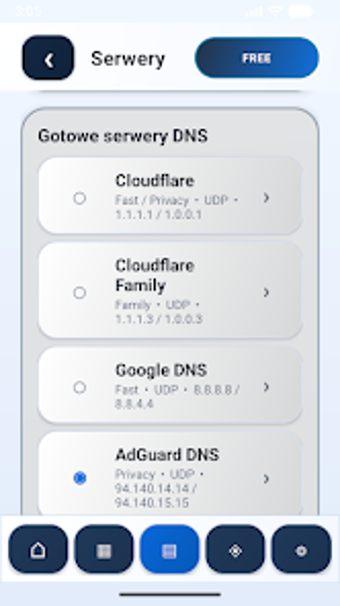
Experience DNS Switcher - Network Tools from AbcIT Studio, an Android utility that gives users direct control over DNS settings across networks. The app runs a local DNS VPN to route queries through chosen resolvers, letting you replace default ISP DNS without root access. It supports quick server selection, preconfigured resolver libraries and custom entries while bundling basic diagnostics. Privacy-conscious users and network administrators gain targeted DNS filtering and per-device name-resolution control.
What does the app change on an Android device?
The app implements DNS routing via a local VPN service rather than altering system network interfaces. In addition, it accepts custom DNS addresses and preconfigured resolver choices, and supports both IPv4 and IPv6 address families. Because the tool routes name resolution only, it does not act as a full network VPN or change the device IP address or geographic routing.
Does DNS switching affect mobile or Wi‑Fi connections?
Built-in diagnostics expose connection behavior through a Speed Test, Wi‑Fi scanning and stability monitoring, so administrators can observe resolver reachability. Encrypted DNS options, listed as DoH and DoT, appear behind premium controls and may change query paths compared with plain DNS. The app supports applying DNS on both Wi‑Fi and cellular (2G/3G/4G/5G) networks for cross-network verification.
Is it safe to use on shared or production networks?
The tool operates without root by using the platform VPN service, which avoids modifying system files while routing DNS. Premium per-app DNS (split-tunneling) lets teams scope DNS policies to specific applications, limiting exposure on shared devices. Because DNS Switcher routes only DNS queries, it does not conceal the device IP, a relevant constraint for environments requiring IP-level auditing.
Do I need technical knowledge to run its advanced tools?
The interface is optimized for Android TV remote navigation while remaining available on smartphones and tablets; the app requires Android 5.0 or later. Routine DNS changes are accessible to casual users through simplified workflows. Advanced diagnostics target network professionals and include:
- SSH client and LAN discovery
- Wake-on-LAN and stability logs
- Reachability checks and detailed Wi‑Fi scans
Practical recommendation and single main caveat
DNS Switcher is a practical option for privacy-conscious users and administrators who need explicit control of DNS routing on Android devices. It pairs remote-capable controls with diagnostic visibility, but several advanced capabilities are restricted to the premium tier, which may limit split-tunneling or encrypted DNS use. For teams needing device-level DNS routing and monitoring without root, it is a dependable choice.